> For the complete documentation index, see [llms.txt](https://docs.pascom.net/llms.txt). Markdown versions of documentation pages are available by appending `.md` to page URLs; this page is available as [Markdown](https://docs.pascom.net/setup/endpoints/doorbell.md).
# Generische Türsprechstelle
So binden Sie generische SIP-fähige Türsprechstellen in die PASCOM Telefonanalge ein
## Übersicht
Die PASCOM Telefonanlage bietet die Möglichkeit, generische Türsprechstellen zu integrieren. Für die Einbindung müssen ein paar Voraussetzungen gegeben sein.
### Voraussetzungen des Endgeräts
Um eine SIP-Türsprechstelle am PASCOM Server betreiben zu können sind folgende Voraussetzungen notwendig:
* **SIP via TCP/TLS** (verschlüsseltes Signaling)
* **Outbound-Proxy** (senden der Daten via Session Border Controller)
## Türsprechstelle einrichten
Gehen Sie auf der PASCOM Admin-Weboberfläche auf **Endgeräte** > **Geräteliste** und klicken Sie auf **Hinzufügen**. Im nächsten Fenster wählen Sie das Template für **generic Doorbell** (generische Türsprechstelle)
### Parameter einrichten
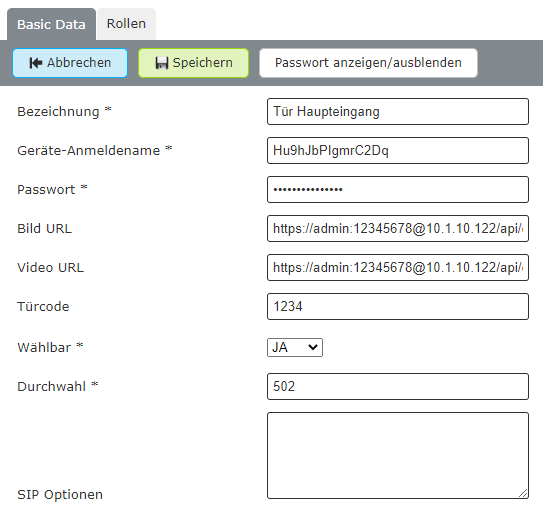
Füllen Sie die vordefinierten Felder mit Ihren Daten aus.
| Feld | Beispiel-Wert | Beschreibung |
| ------------------ | ----------------------------------------------- | --------------------------------------------- |
| Bezeichnung | **Haupteingang** | Der Name der Türsprechstelle |
| Geräte-Anmeldename | **XXXXXXXXXXX** | Anmeldename wird von der **PASCOM generiert** |
| Passwort | **XXXXXXX** | Passwort wird von der **PASCOM generiert** |
| Bild-URL | `https://user:password@1.2.3.4/jpg/image.jpg` | URL der Standbildfunktion |
| Video-URL | `https://user:password@1.2.3.4/mjpg/video.mjpg` | URL der Videostreamfunktion |
| Türcode | **1234** | DTMF Code um die Tür zu öffnen |
| Wählbar | **ja** | Ja/Nein, um die Türsprechstelle anzurufen |
| Durchwahl | **503** | Interne Durchwahl der Türsprechstelle |
**Beispiel**
## Türsprechstellen konfigurieren
Nachfolgend finden Sie eine Übersicht über Türsprechstellen die von PASCOM im Rahmen der Implementation getestet wurden. Generell können Sie jede SIP-fähige Türsprechstelle verwenden. Die nachfolgenden URL-Adressen müssen auf der Türsprechstelle selbst und auch auf der PASCOM Telefonanlage eingerichtet werden. Für die Konfiguration der Türsprechstelle halten Sie als nützliche Hilfestellung zusätzlich die Dokumentation des Herstellers bereit.
### Grundlegende Technologie
| Funktion | Protokoll | Beschreibung |
| --------- | -------------------- | ------------ |
| Standbild | HTTP / HTTPS | JPEG/JPG |
| Video | HTTP / HTTPS / MJPEG | |
### Referenzliste
Hier finden Sie einige Referenz-URLs, für die Integration der Video- und Standbildfunktionalität, welche von PASCOM bereits ausprobiert wurden. **Bitte beachten Sie**, dass die URL-Adressen bei jedem Hersteller unterschiedlich aufgebaut sind.
*Die hier aufgelisteten Hersteller, sollen keinesfalls eine Kaufempfehlung darstellen.*
### Baudisch
| Typ | Beispiel-Wert |
| --------------- | ----------------------------------------------- |
| MJPEG via HTTPS | `https://user:password@1.2.3.4/mjpg/video.mjpg` |
| JPG Bild | `https://user:password@1.2.3.4/jpg/image.jpg` |
**SIP Konfiguration**
**Video Konfiguration**
Bitte beachten Sie, dass zusätzlich das Öffnen der Tür per DTMF-Code konfiguriert werden muss.
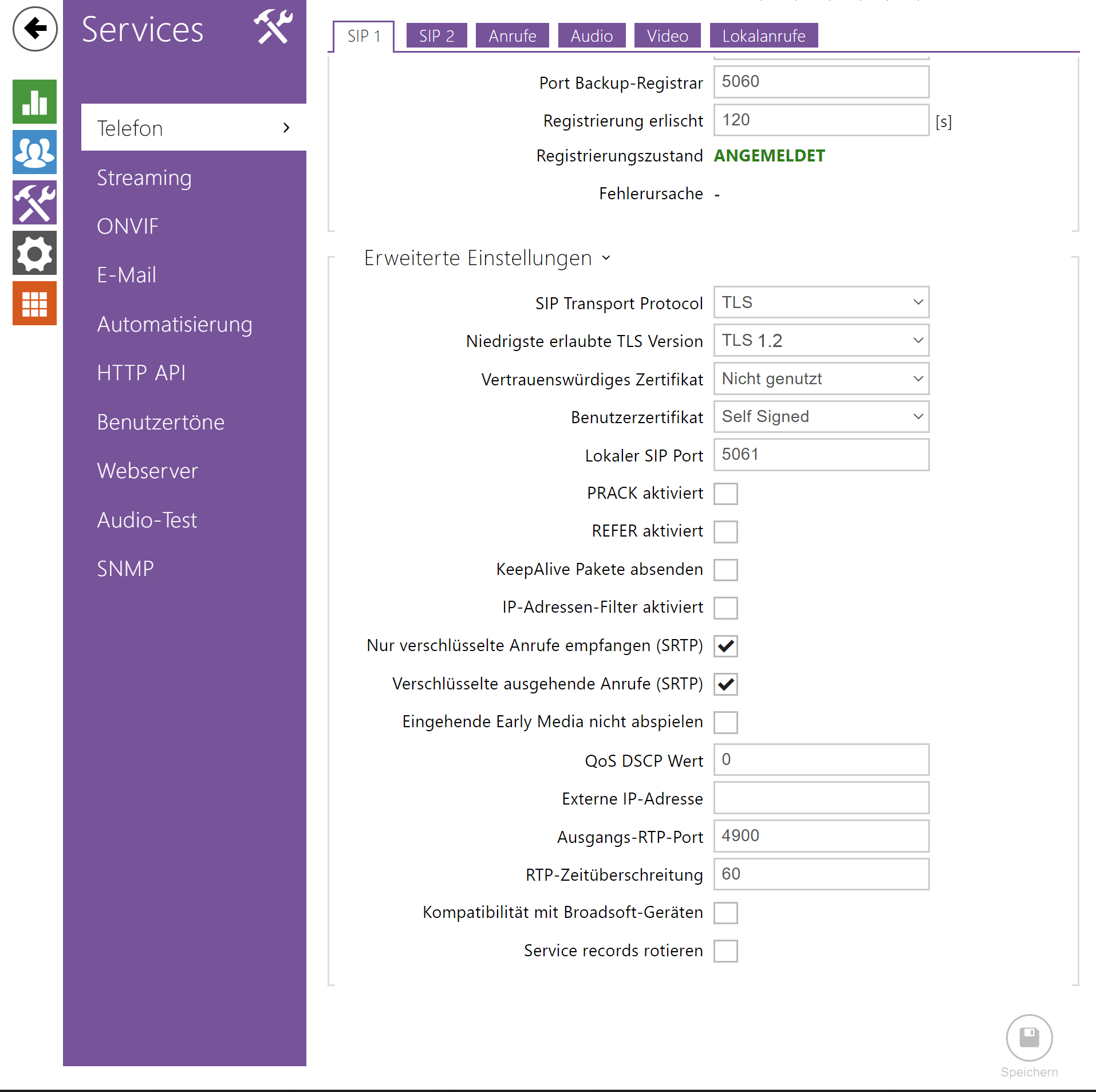
### 2N IP Base
| Typ | Beispiel-Wert |
| ----------- | -------------------------------------------------------------------------------- |
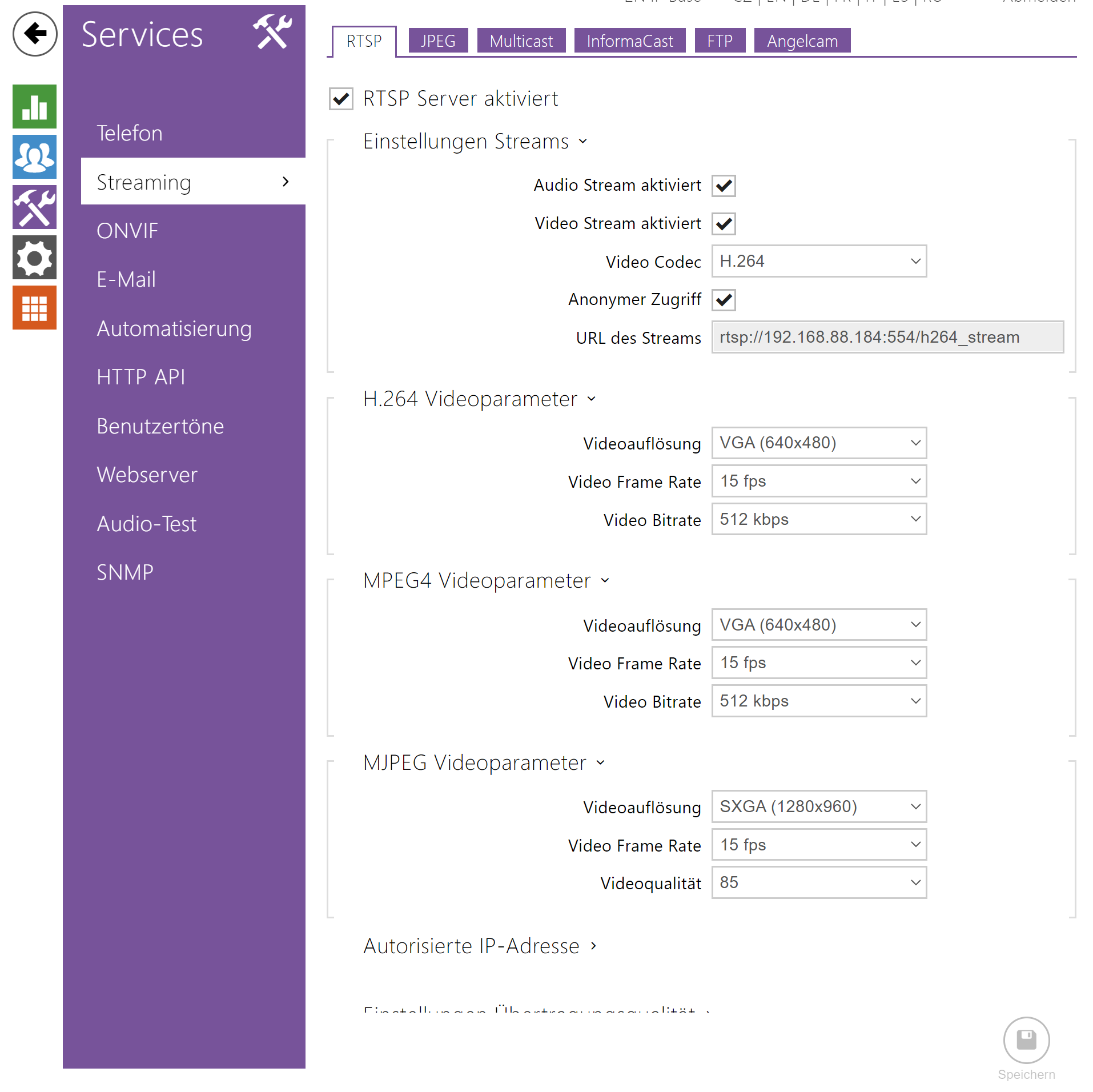
| HTTPS Video | `https://admin:12345678@1.2.3.4/api/camera/snapshot?width=640&height=480&fps=15` |
| JPG Bild | `https://admin:12345678@1.2.3.4/api/camera/snapshot?width=640&height=480` |
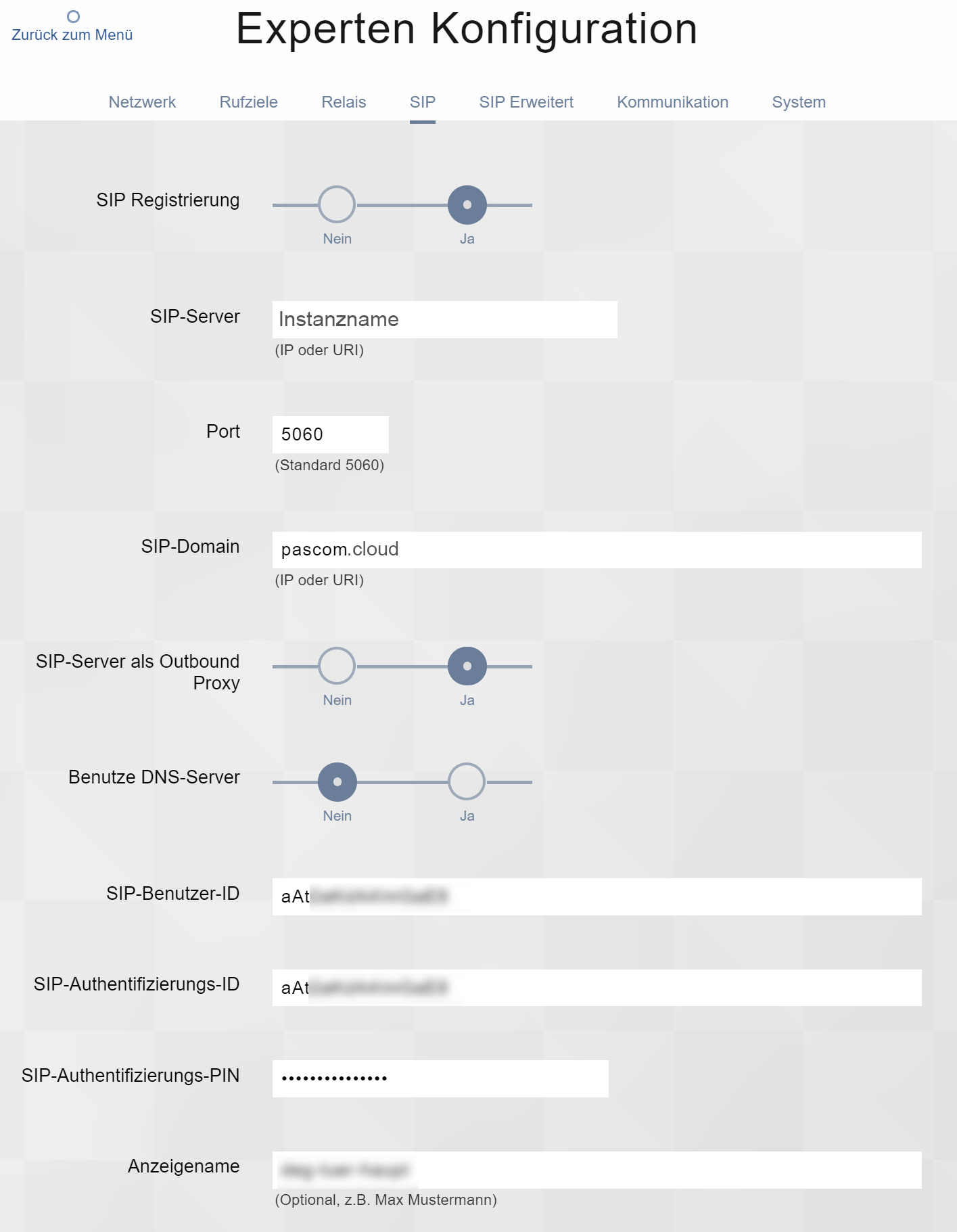
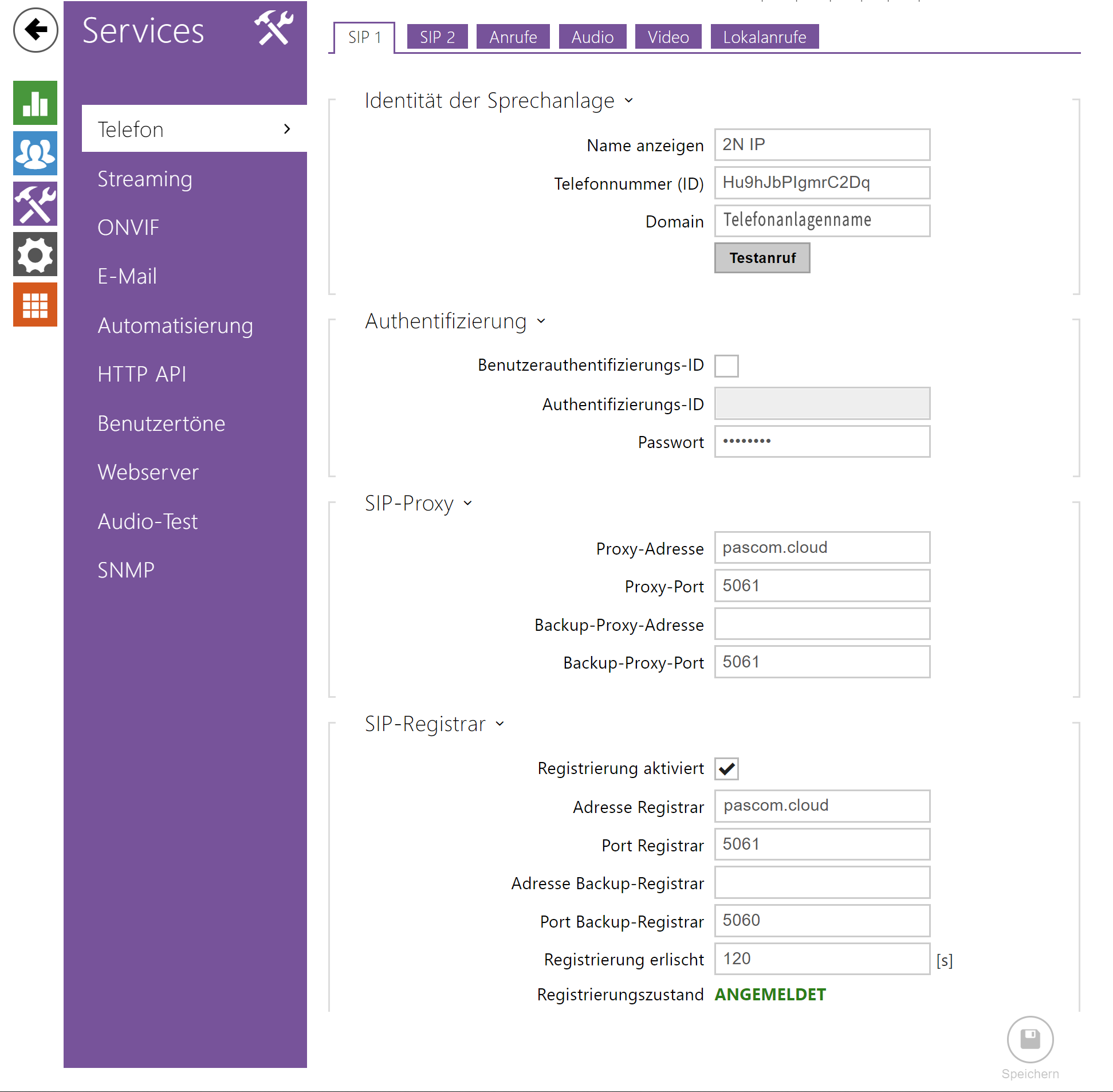
**SIP Konfiguration**
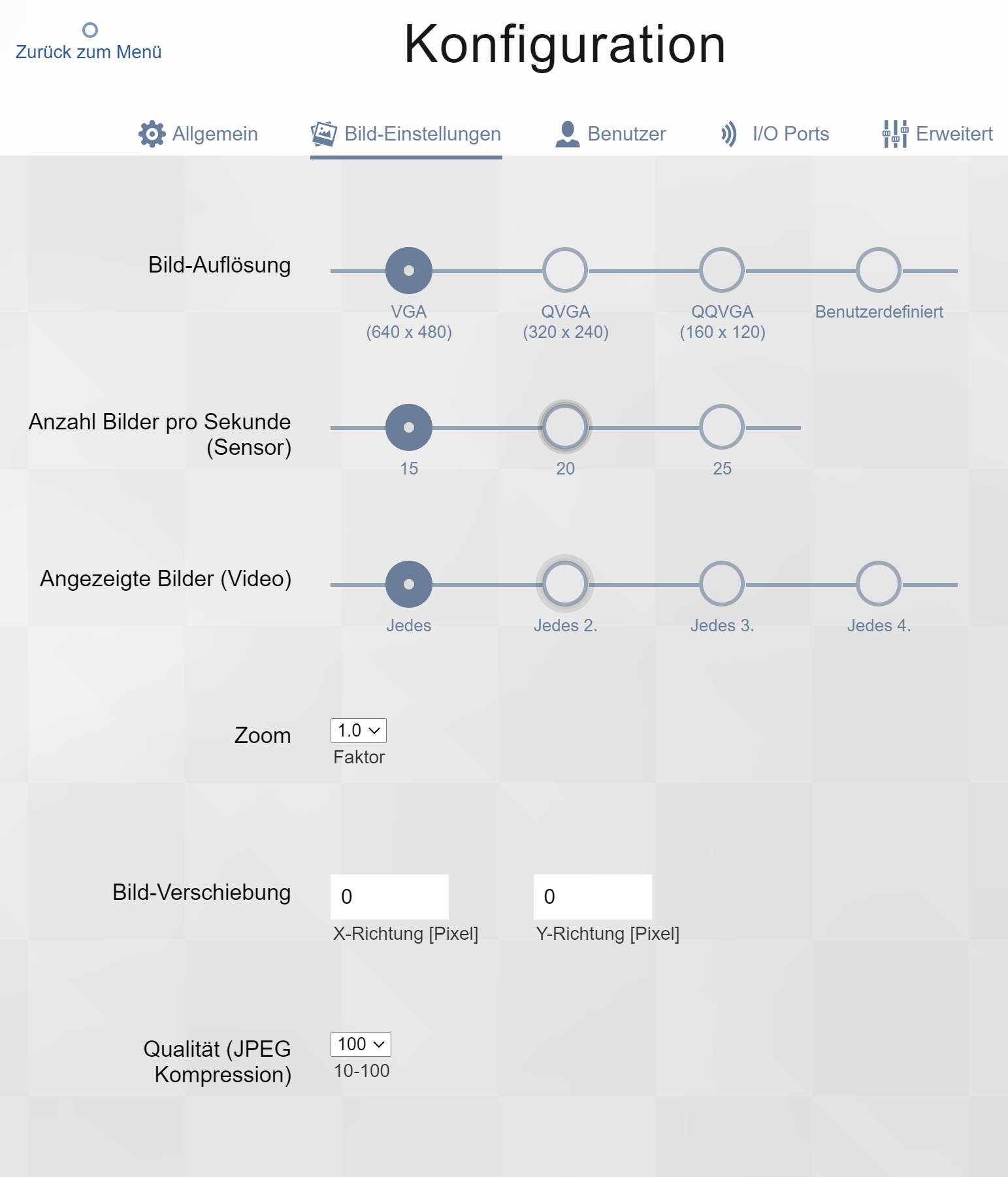
**Video Konfiguration**
Bitte beachten Sie, dass zusätzlich das Öffnen der Tür per DTMF-Code konfiguriert werden muss.
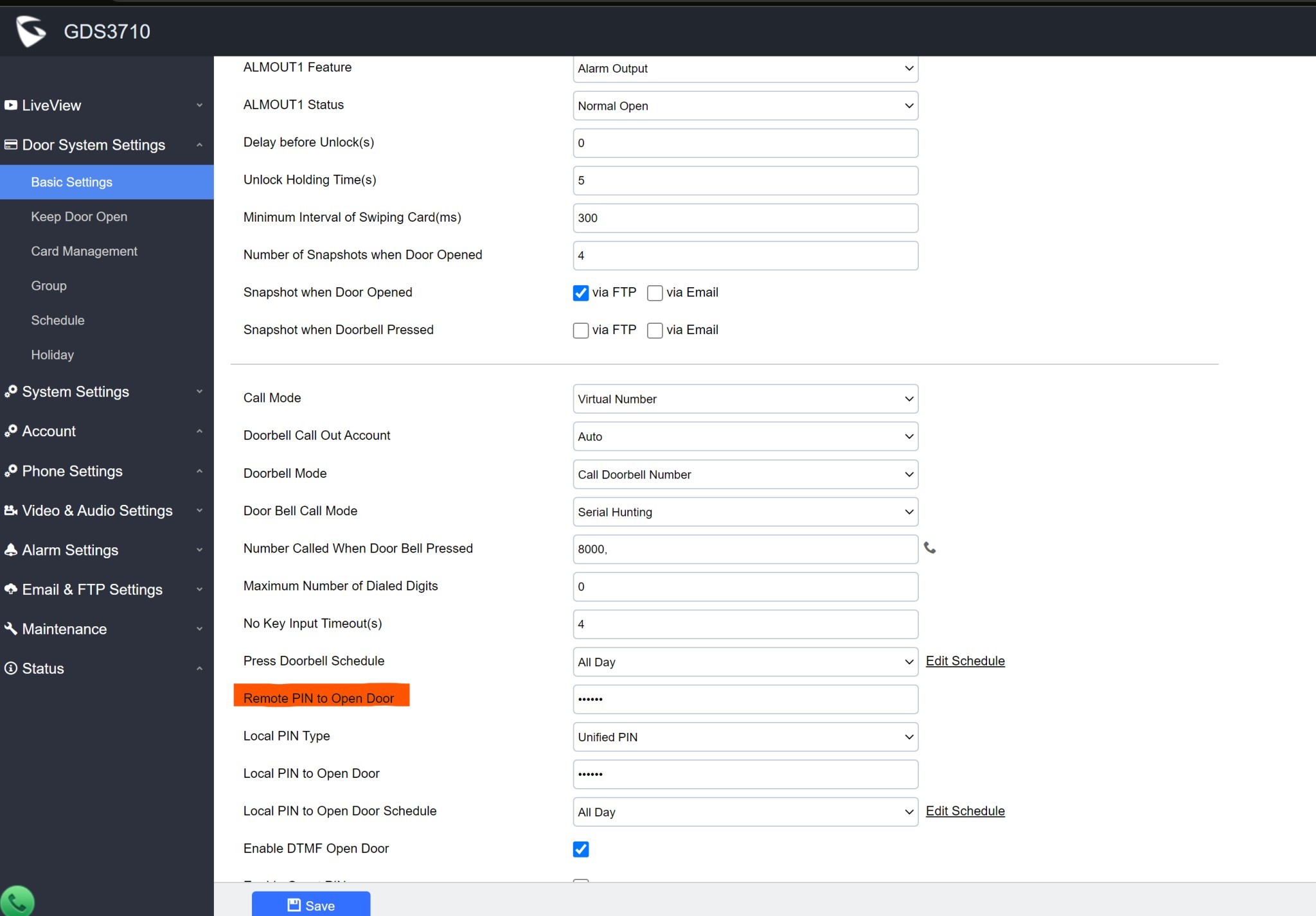
## Grandstream
| Typ | Beispiel-Wert |
| ----------- | -------------------------------------------------- |
| HTTPS Video | `https://admin:password@1.2.3.4/jpeg/mjpeg.html` |
| JPG Bild | `https://admin:1234567@1.2.3.4/snapshot/view0.jpg` |
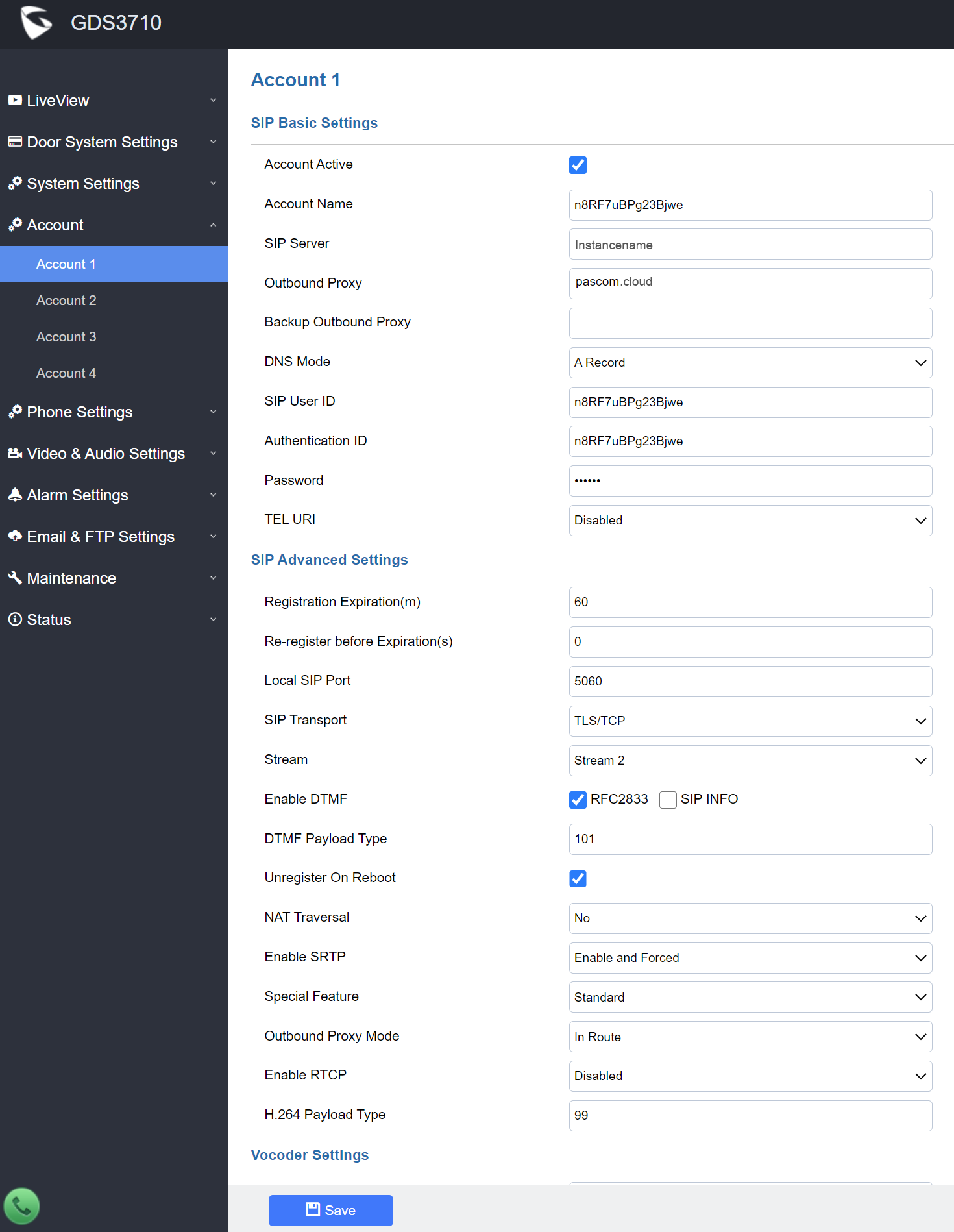
**SIP Konfiguration**
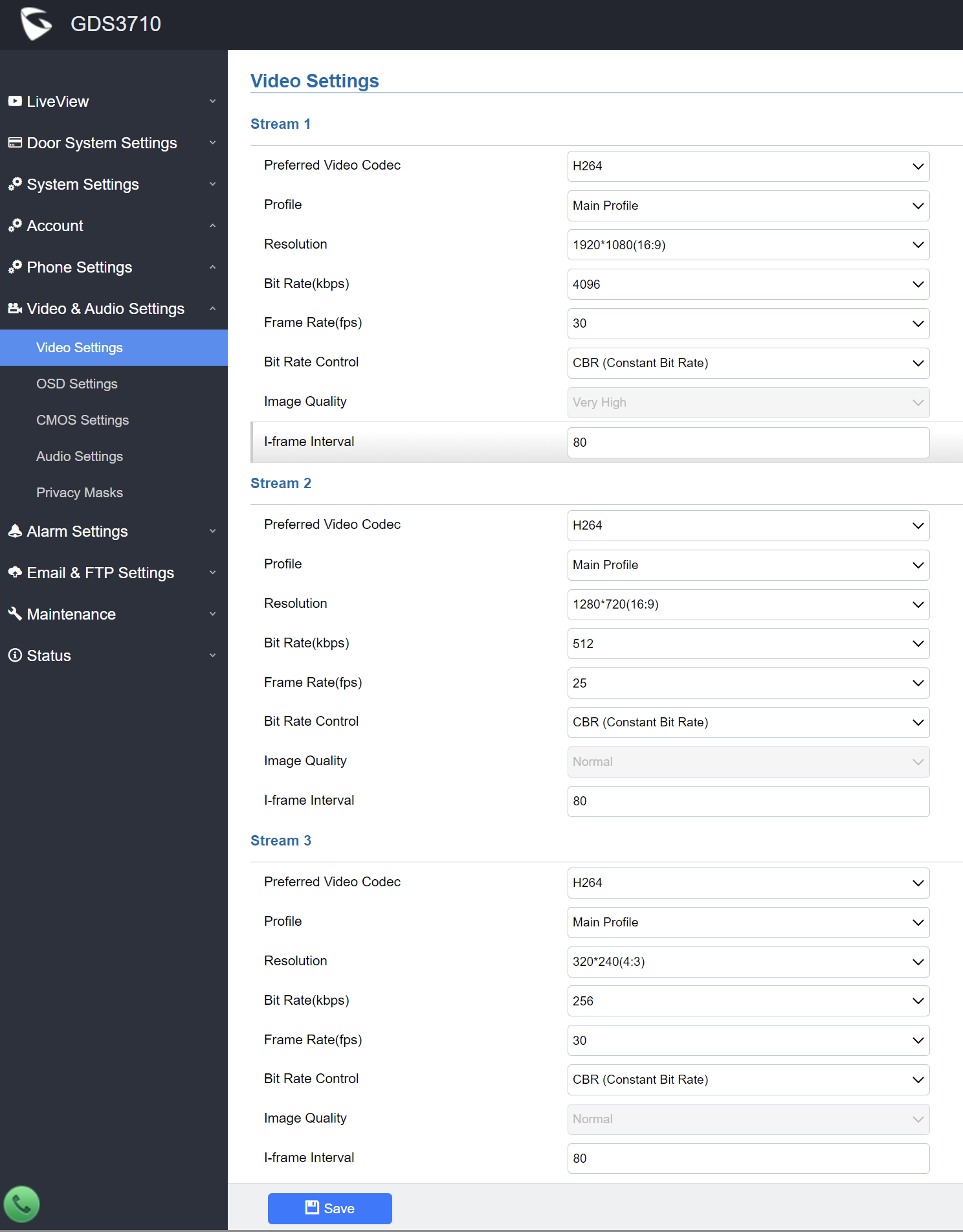
**Video Konfiguration**
Bitte beachten Sie, dass zusätzlich das Öffnen der Tür per DTMF-Code konfiguriert werden muss.
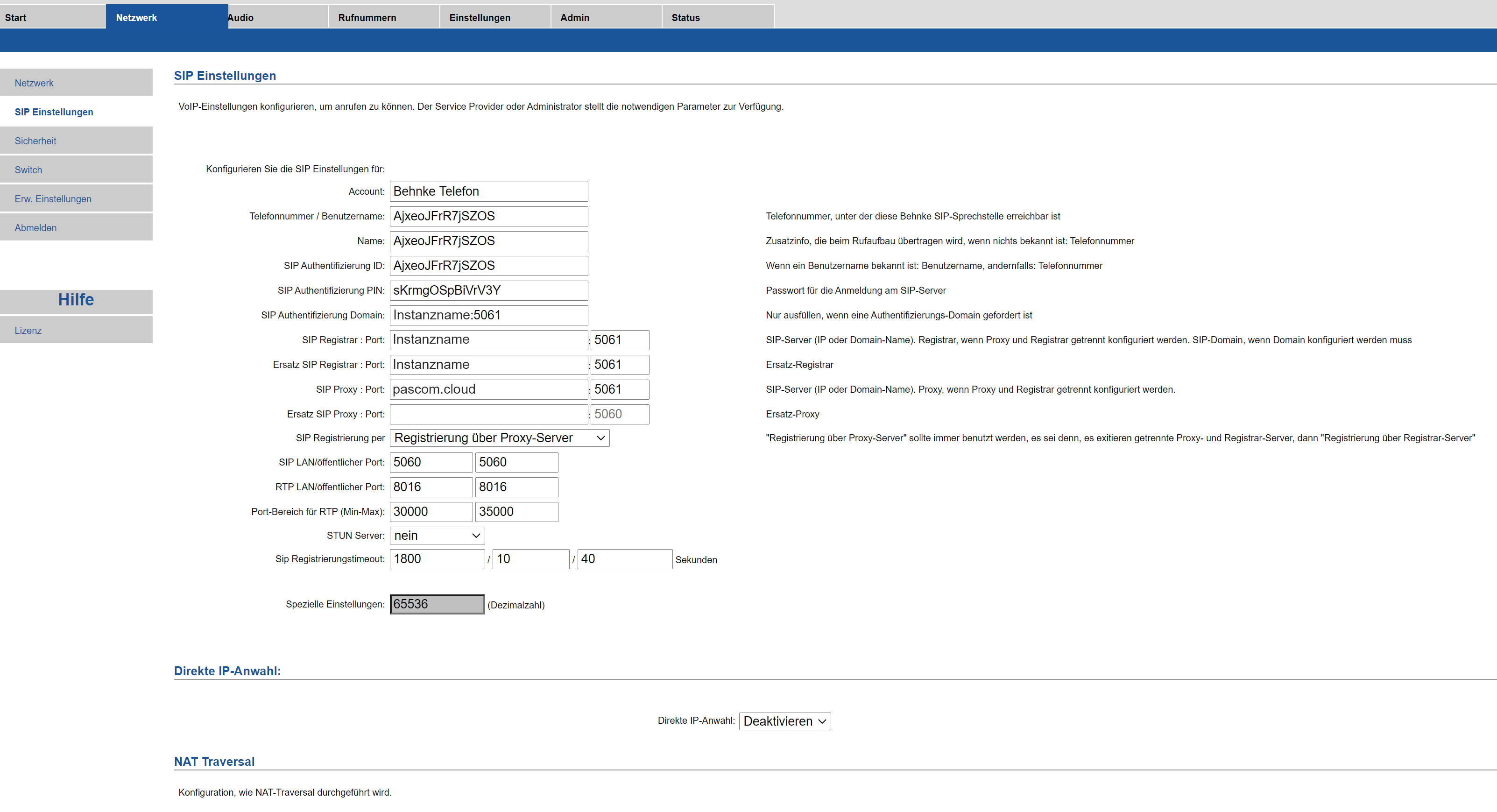
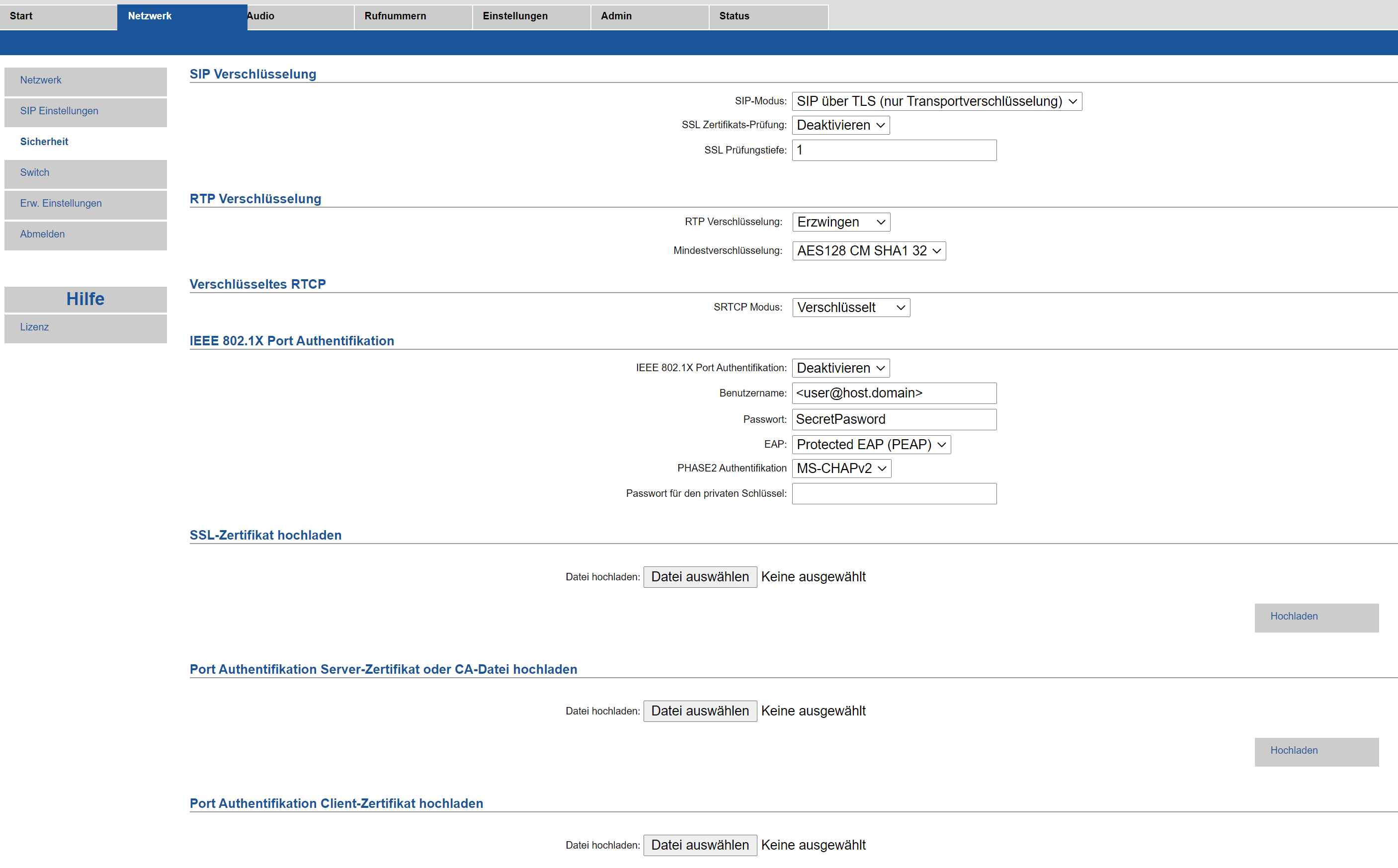
## Behnke
| Typ | Beispiel-Wert |
| ----------- | --------------------------------------------------------- |
| HTTPS Video | `https://viewer:password@1.2.3.4/axis-cgi/mjpg/video.cgi` |
| JPG Bild | `https://viewer:password@1.2.3.4/axis-cgi/jpg/image.cgi` |
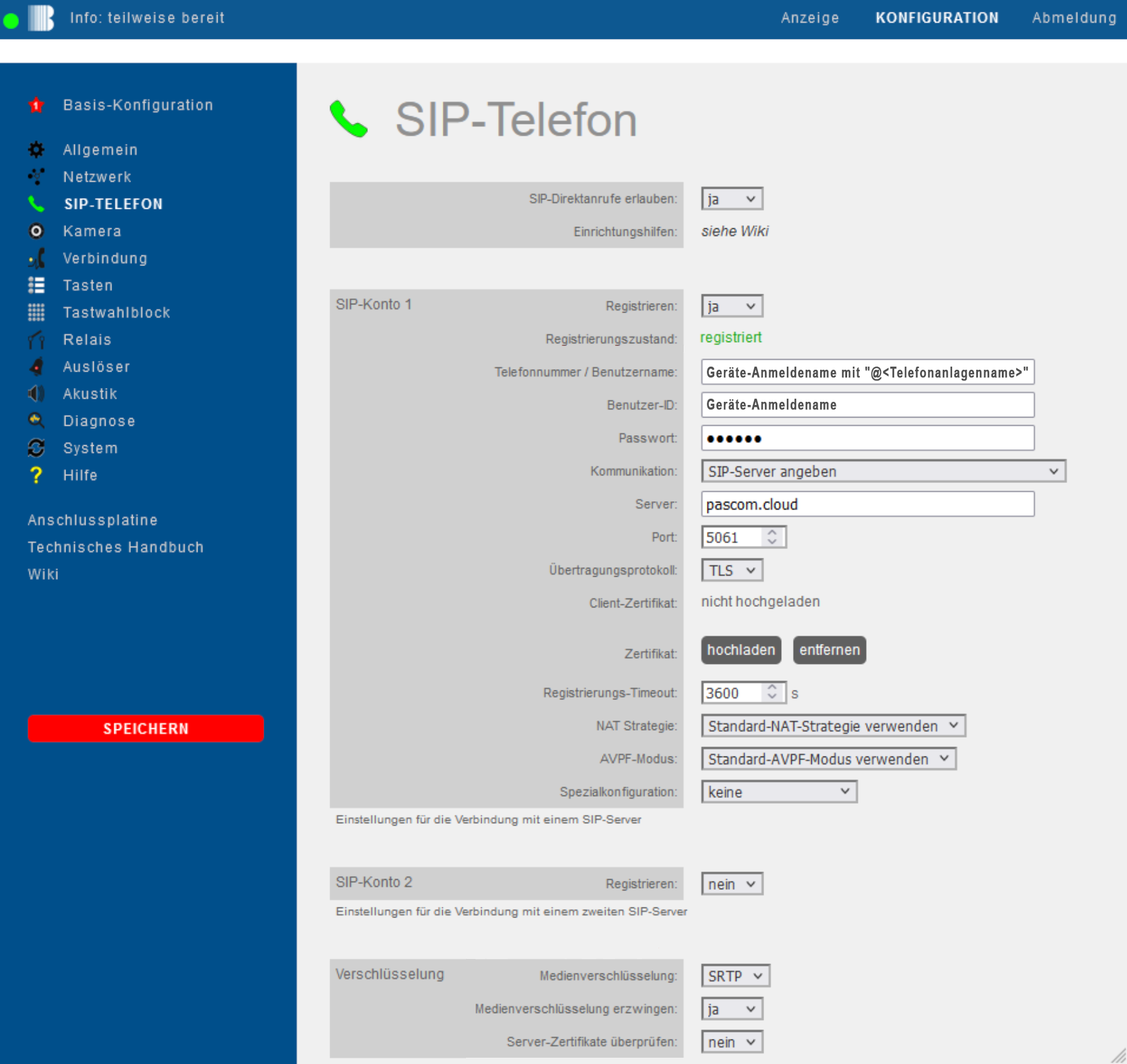
**SIP Konfiguration**
**Neue v.3 Benutzeroberfläche**
| Behnke | Werte |
| ------------------------------- | -------------------------------------------- |
| Telefonnummer/Benutzername | Geräte-Anmeldename mit "@Telefonanlagenname" |
| Benutzer-ID | Geräte-Anmeldename |
| Passwort | Passwort |
| Server | pascom.cloud |
| Port | 5061 |
| Übertragungsprotokoll | TLS |
| Medienverschlüsselung | SRTP |
| Medienverschlüsselung erzwingen | ja |
| Serverzertifikate überprüfen | nein |
**Video Konfiguration**
1. Kein Bild verhanden
Bitte beachten Sie, dass zusätzlich das Öffnen der Tür per DTMF-Code konfiguriert werden muss.
### Gegensprechanlage nutzen
Die Türsprechanlage baut beim betätigen der Klingel einen ganz normalen Anruf auf, welcher über SIP/SRTP von überall aus, entgegengenommen werden kann. Hier muss sich die PASCOM App nicht im selben Netzwerk befinden.
### Türöffner nutzen
Um eine Tür zu öffnen, sendet die PASCOM App während des aktiven Gesprächs einen DTMF Code. Hier muss sich die PASCOM App nicht im selben Netzwerk befinden und der Türöffner kann von überall aus betätigt werden.
### Nützliche Hinweise
1. **Warum haben Iphone Geräte ein schwarzes Bild bei der Übertragung des Videostream?**
Wenn die Türsprechstelle die Bild-/Videodaten via HTTPS mit einem selbstsignierten Zertifkat ausliefert, kann es auf iOS Geräten dazu kommen, dass kein Bild angezeigt wird. Dies ist eine iOS-Sicherheitsrichtlinie. Um ein Bild zu erhalten, muss entweder ein vertrauenswürdiges Zertifikat installiert oder die Türsprechstelle auf HTTP umgeschaltet werden.
---
# Agent Instructions
This documentation is published with GitBook. GitBook is the documentation platform designed so that both humans and AI agents can read, navigate, and reason over technical content effectively. Learn more at gitbook.com.
## Querying This Documentation
If you need additional information that is not directly available in this page, you can query the documentation dynamically by asking a question.
Perform an HTTP GET request on the following URL with the `ask` and `goal` query parameters:
```
GET https://docs.pascom.net/setup/endpoints/doorbell.md?ask=&goal=
```
`ask` is the immediate question: it should be specific, self-contained, and written in natural language.
`goal` is what the user is ultimately trying to achieve, the reason they need the answer. Sharing it helps GitBook give you a better, more relevant answer. A goal is most helpful when it describes the outcome the user wants rather than restating the question. For example, with `ask=how do I create an API token`, a goal like `build a script that syncs our docs to a CMS` lets GitBook tailor the answer to that use case.
The response will contain a direct answer to the question and relevant excerpts and sources from the documentation.
Use this mechanism when the answer is not explicitly present in the current page, you need clarification or additional context, or you want to retrieve related documentation sections.