> For the complete documentation index, see [llms.txt](https://docs.pascom.net/llms.txt). Markdown versions of documentation pages are available by appending `.md` to page URLs; this page is available as [Markdown](https://docs.pascom.net/operations/clients/desktop-update.md).
# Desktop App Update
Die PASCOM App updatet sich automatisch. Durch unsere Update Channels ist es auf einfache Weise möglich Beta- und offizielle Versionen zu nutzen.
## Automatische Updates
Die PASCOM App bezieht ihre Updates via HTTPS über [my.pascom.net](https://my.pascom.net/). Die App ist dabei zu den PASCOM Servern abwärtskompatibel. Wenn ein oder mehrere PASCOM App-Prozesse laufen und ein Update gestartet wird, werden alle Prozesse geschlossen.
## Manuelle Updates
Sie können die automatischen Updates auch durch die Kommandozeilen Option `--noUpdate` unterbinden und Ihre Updates selbst verteilen oder manuell installieren. Die aktuellste PASCOM App steht auf unserer [Homepage](https://www.pascom.net/downloads/) zum Download zur Verfügung.
Automatische Updates werden, auch ohne Angabe des `--noUpdate` Parameter, im Falle einer [Terminalserver Installation](/operations/clients/windows-installation.md#terminalserver-installation) deaktiviert.
Wenn das Update mit Administratorrechten ausgeführt wird (wie bei der Terminalserver-Installation/-Aktualisierung), werden alle Apps für alle Benutzer gestoppt, so dass der Administrator die Anwendungen leichter aktualisieren kann.
## Update-Channels
Ihnen stehen unterschiedliche Update-Channels zur Verfügung. Diese finden Sie in Ihrer Desktop App unter **Einstellungen** > **Über PASCOM App** > **Channel**.
Standardmäßig ist hier der *Stable* Channel ausgewählt - dieser enthält die selbe Version, die Sie auch über unsere [Homepage](https://www.pascom.net/downloads/) erhalten können.
### Beta Programm
Sie können jederzeit den Update-Channel auf den *Beta* Channel umstellen und an unserem Beta Programm teilnehmen.
Ihre Mithilfe ist uns sehr willkommen und wir freuen uns über Ihr Feedback in unserem [Forum](https://www.pascom.net/forum/)
{% hint style="warning" %}
Wenn Sie von einem eigenen Update-Channel oder dem *Beta* Channel auf *Stable* zurück wechseln möchten, werden alle Benutzerprofile gelöscht, da es sich hierbei in der Regel um einen Downgrade handelt. In Ihrem Benutzerprofil sind Einstellungen wie das verwendete Desktop Theme oder Sortierreihenfolgen gespeichert. Diese Einstellungen müssen Sie dann erneut vornehmen.
{% endhint %}
### Feature Channels
Alternativ können Sie manuell einen Feature-Channel einstellen. Diese werden gelegentlich zum testen neuer Einzelfunktionen angelegt und über unser [Forum](https://www.pascom.net/forum/) bzw. den Support bekannt gegeben.
## Aktivieren / Deaktivieren der automatischen Updates
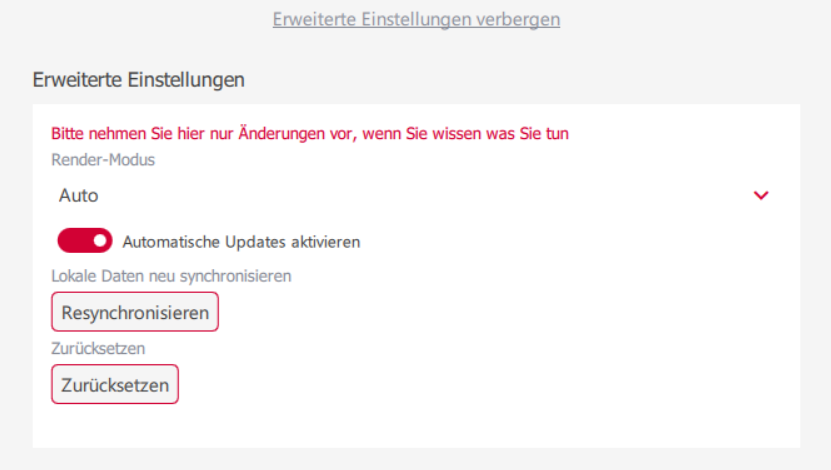
In den **Erweiterten Einstellungen** der App können automatische Updates aktiviert oder deaktiviert werden.
Alternativ können Sie automatische Updates der PASCOM App über Umgebungsvariablen und Kommandozeilenparameter deaktivieren.
| **Befehl / Option** | **Typ** | **Funktion** | **Anwendung** |
| ------------------- | -------------------- | ---------------------------------------------------------------------- | -------------------------------------------------------------------------------------------------------- |
| `PC_NO_UPDATE=1` | Umgebungsvariable | Deaktiviert automatische Updates durch Setzen einer Umgebungsvariable. | Wird z. B. in einem Startskript oder in der Systemumgebung gesetzt, bevor die PASCOM App gestartet wird. |
| `--noUpdate` | Kommandozeilenoption | Deaktiviert automatische Updates beim Start der App. | Wird direkt an den Startbefehl der Anwendung angehängt, z. B. `pascom.exe --noUpdate`. |
### Beispiel
**Mit Umgebungsvariable (z. B. unter Linux/macOS Bash oder Windows-Batch):**
```
PC_NO_UPDATE=1 ./pascom.exe
```
Hier erhalten Sie eine Übersicht über weitere [Kommandozeilenparameter](/operations/clients/environment-variables.md)
---
# Agent Instructions
This documentation is published with GitBook. GitBook is the documentation platform designed so that both humans and AI agents can read, navigate, and reason over technical content effectively. Learn more at gitbook.com.
## Querying This Documentation
If you need additional information that is not directly available in this page, you can query the documentation dynamically by asking a question.
Perform an HTTP GET request on the following URL with the `ask` and `goal` query parameters:
```
GET https://docs.pascom.net/operations/clients/desktop-update.md?ask=&goal=
```
`ask` is the immediate question: it should be specific, self-contained, and written in natural language.
`goal` is what the user is ultimately trying to achieve, the reason they need the answer. Sharing it helps GitBook give you a better, more relevant answer. A goal is most helpful when it describes the outcome the user wants rather than restating the question. For example, with `ask=how do I create an API token`, a goal like `build a script that syncs our docs to a CMS` lets GitBook tailor the answer to that use case.
The response will contain a direct answer to the question and relevant excerpts and sources from the documentation.
Use this mechanism when the answer is not explicitly present in the current page, you need clarification or additional context, or you want to retrieve related documentation sections.