> For the complete documentation index, see [llms.txt](https://docs.pascom.net/llms.txt). Markdown versions of documentation pages are available by appending `.md` to page URLs; this page is available as [Markdown](https://docs.pascom.net/operations/clients/client-shownumbers.md).
# Gesprächsteilnehmer in Kontaktliste anzeigen
Lassen Sie sich die Rufnummern der Gesprächspartner Ihres Teams direkt in der App-Kontaktliste anzeigen
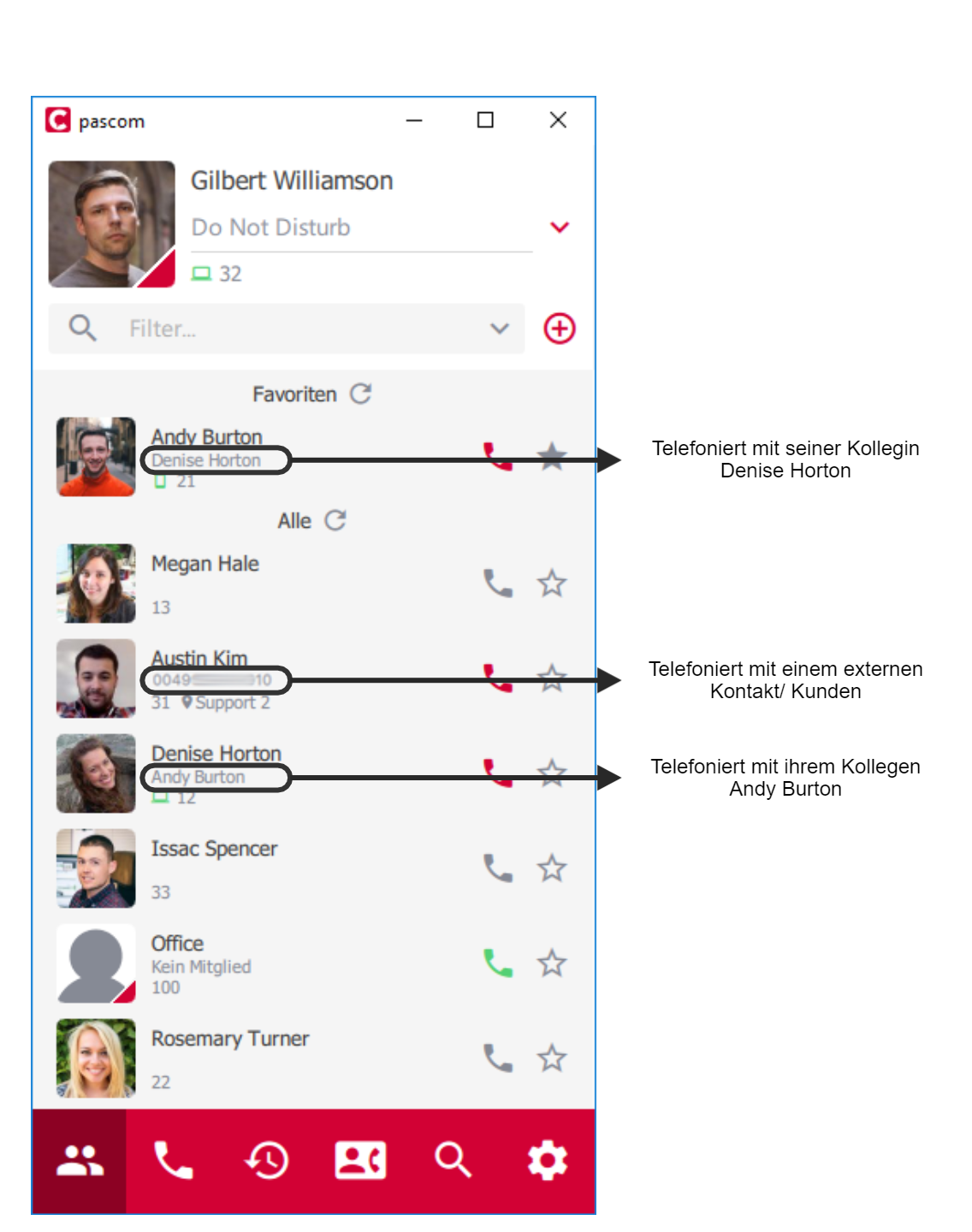
Wenn es für Ihr Team sinnvoll ist jederzeit in der PASCOM App überprüfen zu können, mit wem ein Kollege oder Mitarbeiter gerade spricht, können Sie mit dem Setzen einer zusätzlichen Systemvariable diese Information in Ihrer [PASCOM App](/user/pascom-app-userguide.md) anzeigen lassen. So ist für jeden Benutzer direkt in der Kontaktliste die Nummer, und bei vorhandenem Telefonbucheintrag, der Name des Gesprächspartners sichtbar.
{% hint style="info" %}
Die Darstellung des Anrufers/ Gesprächsteilnehmers in der Kontaktliste gilt global für jeden Benutzer der Desktop und Mobile App unabhängig von zugewiesenen Benutzerrechten.
{% endhint %}
## Systemvariable setzen
Wählen Sie in der WebUI Ihrer PASCOM Telefonanlage unter **Einstellungen** > **Systemeinstellungen** aus. Dort gibt es eine Variable mit dem Parameter **sys.xmpp.properties.roster.shownumbers**. Setzen Sie dessen Wert auf **true**.
Speichern Sie anschließend diese Änderung.
## Beispiel
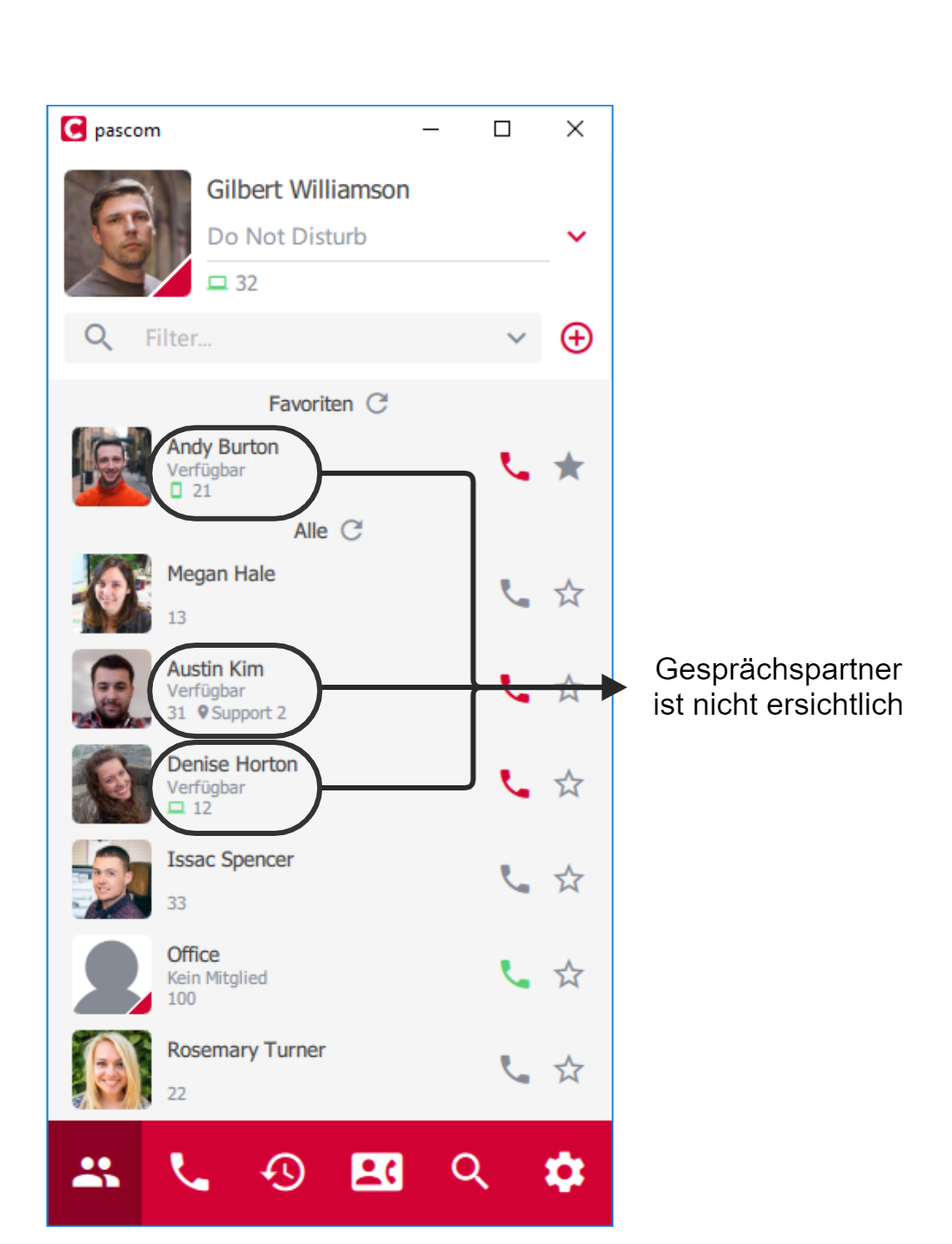
Anhand folgendem Beispiel sehen Sie die Auswirkung dieser Systemeinstellung.
*Systemvariable* ***sys.xmpp.properties.roster.shownumbers*** *nicht gesetzt, oder Wert auf* '***false***'
*Systemvariable* ***sys.xmpp.properties.roster.shownumbers*** *gesetzt mit Wert auf* '***true***'
---
# Agent Instructions
This documentation is published with GitBook. GitBook is the documentation platform designed so that both humans and AI agents can read, navigate, and reason over technical content effectively. Learn more at gitbook.com.
## Querying This Documentation
If you need additional information that is not directly available in this page, you can query the documentation dynamically by asking a question.
Perform an HTTP GET request on the following URL with the `ask` and `goal` query parameters:
```
GET https://docs.pascom.net/operations/clients/client-shownumbers.md?ask=&goal=
```
`ask` is the immediate question: it should be specific, self-contained, and written in natural language.
`goal` is what the user is ultimately trying to achieve, the reason they need the answer. Sharing it helps GitBook give you a better, more relevant answer. A goal is most helpful when it describes the outcome the user wants rather than restating the question. For example, with `ask=how do I create an API token`, a goal like `build a script that syncs our docs to a CMS` lets GitBook tailor the answer to that use case.
The response will contain a direct answer to the question and relevant excerpts and sources from the documentation.
Use this mechanism when the answer is not explicitly present in the current page, you need clarification or additional context, or you want to retrieve related documentation sections.