> For the complete documentation index, see [llms.txt](https://docs.pascom.net/llms.txt). Markdown versions of documentation pages are available by appending `.md` to page URLs; this page is available as [Markdown](https://docs.pascom.net/integrations/connector/automation.md).
# Automatisierung
Lernen Sie wie der Connector automatisiert werden kann.
## Connector automatisieren
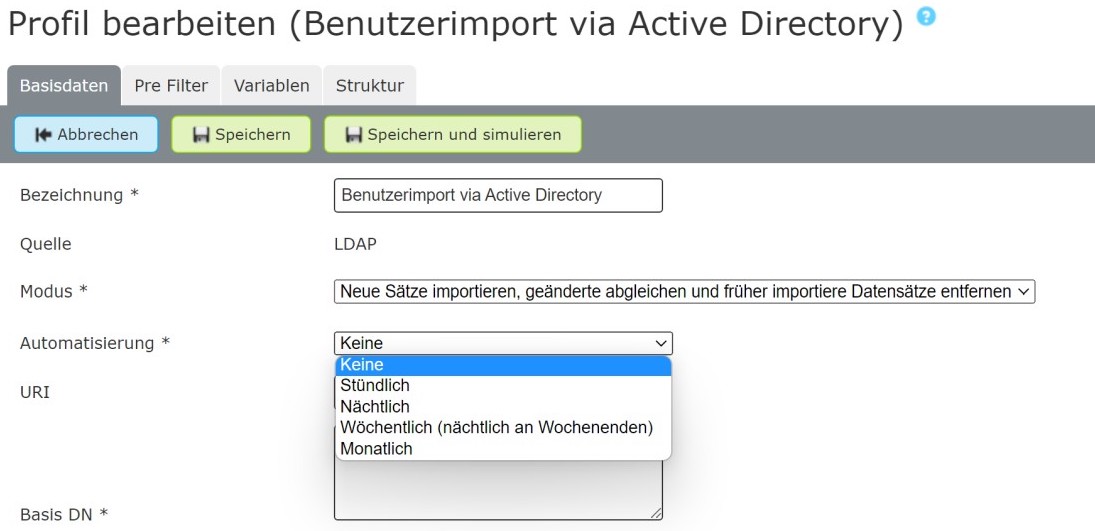
Im Reiter **Basisdaten** des Connectors kann man den Datenimport automatisiert zu bestimmten Intervallen von der PASCOM Telefonanlage durchführen lassen. Ändern Sie dazu den Punkt **Automatisierung**.
{% hint style="info" %}
Eine Automatisierung ist nur möglich, wenn die Daten nicht aus einer manuellen Quelle (z.B. einer CSV-Datei) kommen, da diese händisch hochgeladen werden muss.
{% endhint %}
### Automatisierungsintervalle erklärt.
Bei der Automatisierung haben Sie keinen direkten Einfluss auf feste Zeiten zu denen der Datenimport durchgeführt werden soll. Stattdessen werden Zeiten flexibel durch die PASCOM Telefonanlage bestimmt. Sie können aber die Intervalle in denen der Datenimport gestartet werden soll, festlegen.
**Keine**
* deaktiviert die Automatisierung.
**Stündlich**
* Minute = 0 - 59
**Nächtlich**
* Minute = 0 - 59
* Stunde = 22 - 05
**Wöchentlich**
* Minute = 0 - 59
* Stunde = 22 - 05
* Wochentag = Samstag oder Sonntag
**Monatlich**
* Minute = 0 - 59
* Stunde = 22 - 05
* Tag = Zwischen dem 01. und 05. des aktuellen Monats
### Automatisierungsbeispiele
Sie möchten täglich einen Datenimport durchführen. Wählen Sie dazu **nächtlich** aus.
**Nächtlich**
* Minute = 0 - 59
* Stunde = 22 - 05
Der Datenimport wird dann in einem täglichen Intervall zwischen 22 Uhr Abends und 05 Uhr Morgens durchgeführt.
***
Sie möchten wöchentlich einen Datenimport durchführen. Wählen Sie dazu **wöchentlich** aus.
**Wöchentlich**
* Minute = 0 - 59
* Stunde = 22 - 05
* Wochentag = Samstag oder Sonntag
Der Datenimport wird dann in einem wöchentlichen Intervall jeweils Samstag oder Sonntag, zwischen 22 Uhr Abends und 05 Uhr Morgens durchgeführt.
---
# Agent Instructions
This documentation is published with GitBook. GitBook is the documentation platform designed so that both humans and AI agents can read, navigate, and reason over technical content effectively. Learn more at gitbook.com.
## Querying This Documentation
If you need additional information that is not directly available in this page, you can query the documentation dynamically by asking a question.
Perform an HTTP GET request on the following URL with the `ask` and `goal` query parameters:
```
GET https://docs.pascom.net/integrations/connector/automation.md?ask=&goal=
```
`ask` is the immediate question: it should be specific, self-contained, and written in natural language.
`goal` is what the user is ultimately trying to achieve, the reason they need the answer. Sharing it helps GitBook give you a better, more relevant answer. A goal is most helpful when it describes the outcome the user wants rather than restating the question. For example, with `ask=how do I create an API token`, a goal like `build a script that syncs our docs to a CMS` lets GitBook tailor the answer to that use case.
The response will contain a direct answer to the question and relevant excerpts and sources from the documentation.
Use this mechanism when the answer is not explicitly present in the current page, you need clarification or additional context, or you want to retrieve related documentation sections.