> For the complete documentation index, see [llms.txt](https://docs.pascom.net/llms.txt). Markdown versions of documentation pages are available by appending `.md` to page URLs; this page is available as [Markdown](https://docs.pascom.net/en/setup/pascom-trunk/pascom-trunk-explained.md).
# PASCOM SIP Trunking explained
Here we explain the use of the PASCOM SIP Trunk.
### What is PASCOM trunking?
PASCOM Trunking is the term used to describe PASCOM's SIP Trunk. This SIP Trunk is not physically set up at your location, but is a virtual phone number. To make and receive calls via your PASCOM SIP trunk, all that you need an Internet connection and the PASCOM apps, meaning you can work from literally almost anywhere.
### Managing your PASCOM phone numbers
You can easily manage your PASCOM phone numbers via the myPASCOM portal. Simply log in to the myPASCOM portal with your account credentials and click the **Subscriptions** menu option. This will take you to an overview of your subscriptions. Next choose the **PASCOM cloud telephone system** 1where your would liek to manage the associated phone numbers and click the **Details** button.
> 1 In most cases, you will only have one phone system subscription to choose from.
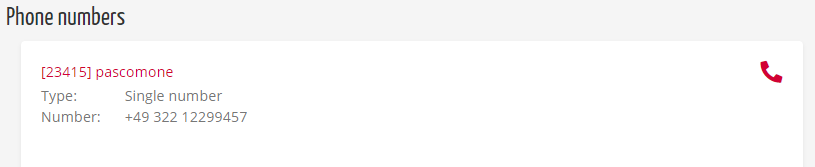
All associated phone numbers are also listed at the bottom of the details overview.
### Status of PASCOM phone numbers
PASCOM phone numbers are assigned with a status as described below:
| Status | Description |
| ------- | ------------------------------------------------------------------------------------------------------------------------ |
| Pending | The phone number is still in the registration phase. This process can take up to 20 minutes |
| Active | The phone number can be actively used by the PASCOM PBX |
| Dead | The phone number is linked to the subscription which has been cancelled which also cancels the phone number registration |
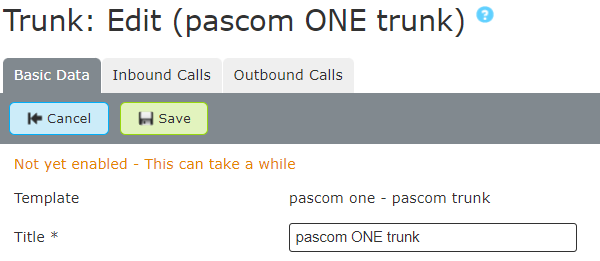
In addition to this, if you log into your PASCOM cloud phone system admin UI and go to **Gateways** > **trunks**, select the trunk and then go to the basic data tab, you will receive a notification if the PASCOM Trunk is usable.
### Create or buy new PASCOM phone numbers
Your PASCOM ONE phone system subscription already includes phone numbers which are available for your to use. The number of phone numbers available is based on the number of user licences contained within your subscription. Should you require more phone numbers than those already included, you can of course purchase additional phone numbers.
Simply log into your myPASCOM account and select the **Phone Numbers** menu option. This will direct you to an overview of all your phone numbers. To add further phone numbers, click the **Add phone number** button.
Next, you will need to select the phone system subscription to which you would like to add more phone numbers.
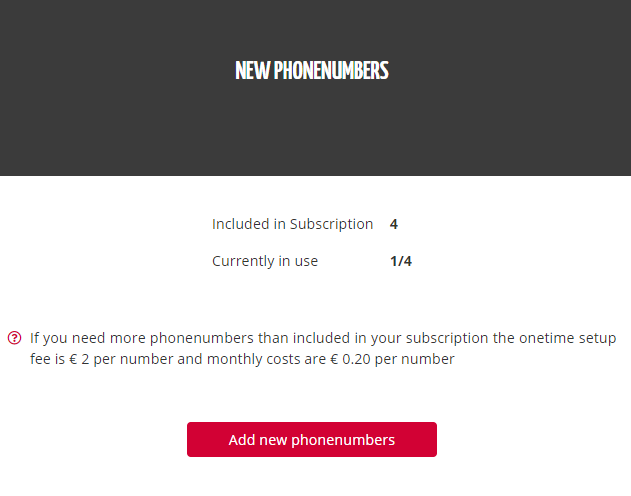
Under the **New phone numbers** section, the amount of phone numbers included in your subscription and how many are already in use is displayed.
Next, click **Add new phone number** the button.
{% hint style="success" %}
If you need more phone numbers than the amount alredy included in your subscription, you can purchase additional phone numbers (additional cost).
{% endhint %}
If you have not already done so, the next step requires you to upload a current phone bill or business registration certificate for verification purposes.
#### Select phone number block
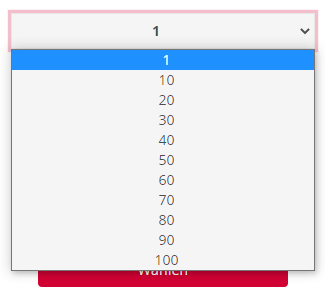
In the next step, you can select the amount of phone numbers (**block size**) that you wish to purchase.
The phone number block size "1" is used for single phone numbers. Otherwise, you can change size of the required phone number block in increments of 10. When using a phone number block with a size of 10 or more, based numbers followed by extension numbers are generated.
After selecting your desired phone number block size, you have the option to choose from 3 suggested phone number patterns.
If you have chosen a phone number block size of 10 phone numbers or more numbers, only the base number pattern will change, while the extension numbers remain the same.
1. Single phone number
2. Phone numbers with extension
Clicking on the button **Next** will take you to the order overview where you can review your order details and complete the purchase.
### Provisioning period of new PASCOM phone numbers
The provisioning and registration of new purchased or ported phone numbers usually takes 1 business day. You can see the status of your phone numbers in the myPASCOM portal via the **phone numbers** menu.
### Can I port my existing phone numbers to PASCOM?
If you would like to port your existing phone numbers hosted by a third party provider, you can do so via our porting option. To do so, follow the steps above, but rather than selecting the **New phone numbers** option, select the **Port Existing Phone Numbers** option:

Alternatively, you can set up your existing provider on the PASCOM telephone system, as long as it is supported by PASCOM. A list of supported providers can be found [here](/en/setup/pascom-trunk/external-providers.md).
### Adjusting the caller ID for international calls
The caller ID of a PASCOM phone number cannot be changed so that the outgoing calls are displayed with the foreign area code instead of the german area code by the called party. This is because PASCOM is not legally permitted to change or suppress the CLIP display for foreign numbers.
---
# Agent Instructions
This documentation is published with GitBook. GitBook is the documentation platform designed so that both humans and AI agents can read, navigate, and reason over technical content effectively. Learn more at gitbook.com.
## Querying This Documentation
If you need additional information that is not directly available in this page, you can query the documentation dynamically by asking a question.
Perform an HTTP GET request on the following URL with the `ask` and `goal` query parameters:
```
GET https://docs.pascom.net/en/setup/pascom-trunk/pascom-trunk-explained.md?ask=&goal=
```
`ask` is the immediate question: it should be specific, self-contained, and written in natural language.
`goal` is what the user is ultimately trying to achieve, the reason they need the answer. Sharing it helps GitBook give you a better, more relevant answer. A goal is most helpful when it describes the outcome the user wants rather than restating the question. For example, with `ask=how do I create an API token`, a goal like `build a script that syncs our docs to a CMS` lets GitBook tailor the answer to that use case.
The response will contain a direct answer to the question and relevant excerpts and sources from the documentation.
Use this mechanism when the answer is not explicitly present in the current page, you need clarification or additional context, or you want to retrieve related documentation sections.