> For the complete documentation index, see [llms.txt](https://docs.pascom.net/llms.txt). Markdown versions of documentation pages are available by appending `.md` to page URLs; this page is available as [Markdown](https://docs.pascom.net/en/setup/pascom-trunk/basesettings.md).
# Basic Settings
The basic settings of the trunk allows you to further adapt the data from the trunk templates.
## The Basic Data
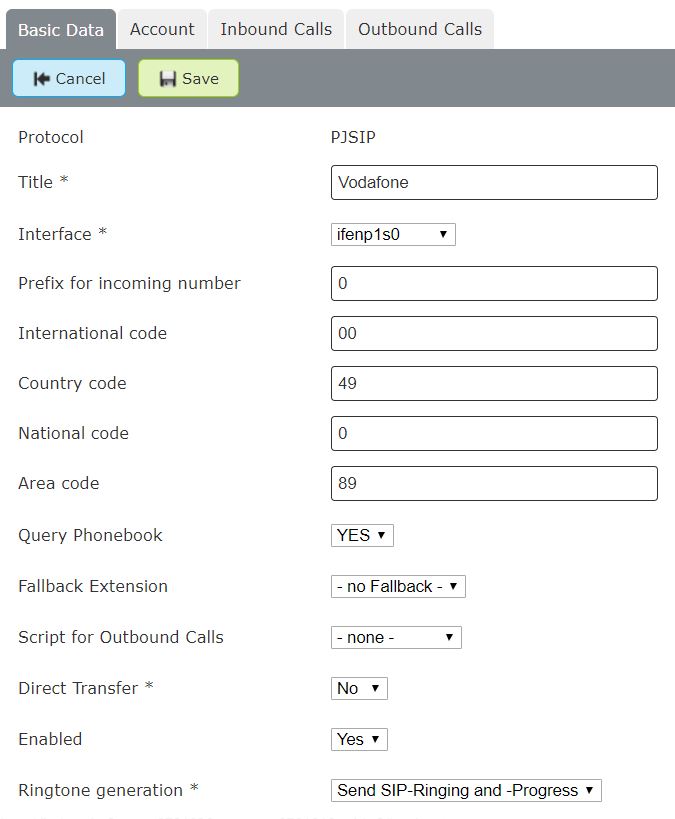
You can access the basic settings of your Trunk via **Gateways**> **Trunks**> **Edit**. The **Basic data** tab gives you the following setting options.
| Variable | Description |
| -------------------------- | ---------------------------------------------------------------------------------------------------------------------------------------------------------------------------------------------------------------------------------------------------------------------------------------------------------------------------------------------- |
| **Title** | Enter a name for the trunk, which is then displayed in the Trunks overview list |
| **Interface** | Select the interface for the outbound proxy. **Default** deactivates the outbound proxy. **ONSITE ONLY**. |
| **Prefix Incoming Number** | Any pre-set number which is attached to incoming calls via this trunk. If, for example, you enter a **0**, then calls to this number may appear in your IP phone's call history as `00172123123` instead of `0172123123`. This allows users to directly callback numbers in the call history using the same trunk over which the call came in. |
| **International Prefix** | The characters or numbers needed to dial international numbers - ordinarily *00*. |
| **Country Code** | Enter the country code for the Trunk's originating country. For example, the UK is **44**. SIP trunks allow you to have your phone system server located in one country and register it with a trunk from another country via the internet. Therefore, enter the country code for where the Trunk is located, not the phone system server. |
| **National Prefix** | The numbers which need to be dialled in order to make a call to a national landline (with an area code) - ordinarilly *0*. |
| **Area Code** | Enter the area code (excluding the proceeding 0). For example for London you would enter 20 instead of 020. |
| **Query Phonebook** | If you set this option to **Yes**, PASCOM will try to look up every incoming call in the central phonebook and, if successful, display the caller's name on the telephone screen. This option only applies to IP telephones as the desktop app always tries to find and display corresponding phonebook entries for incoming calls. |
| **Fallback Extension** | Should no call rules exist for an extension, the caller will be routed to this extension. |
| **Outbound Script** | This setting can integrate a script for outbound calls. |
| **Direct Forwarding** |
This setting determines how call redirection / forwards which come from external sources and then leave the PBX again should be handled. There are 3 options: - Keep calls in the system -Answer calls and keep them in the system -Forward calls via the Provider (Call Deflection)
|
| **Enabled** | yes / no - if the trunk is enabled, the PASCOM server trys to register to the provider servers |
| **Ringtone generation** | This setting determines how the dial tone should be generated via SIP. There are several options here. From SIP ringing to progress generation to completely deactivated. |
---
# Agent Instructions
This documentation is published with GitBook. GitBook is the documentation platform designed so that both humans and AI agents can read, navigate, and reason over technical content effectively. Learn more at gitbook.com.
## Querying This Documentation
If you need additional information that is not directly available in this page, you can query the documentation dynamically by asking a question.
Perform an HTTP GET request on the following URL with the `ask` and `goal` query parameters:
```
GET https://docs.pascom.net/en/setup/pascom-trunk/basesettings.md?ask=&goal=
```
`ask` is the immediate question: it should be specific, self-contained, and written in natural language.
`goal` is what the user is ultimately trying to achieve, the reason they need the answer. Sharing it helps GitBook give you a better, more relevant answer. A goal is most helpful when it describes the outcome the user wants rather than restating the question. For example, with `ask=how do I create an API token`, a goal like `build a script that syncs our docs to a CMS` lets GitBook tailor the answer to that use case.
The response will contain a direct answer to the question and relevant excerpts and sources from the documentation.
Use this mechanism when the answer is not explicitly present in the current page, you need clarification or additional context, or you want to retrieve related documentation sections.