> For the complete documentation index, see [llms.txt](https://docs.pascom.net/llms.txt). Markdown versions of documentation pages are available by appending `.md` to page URLs; this page is available as [Markdown](https://docs.pascom.net/en/setup/pascom-trunk/accountsettings.md).
# Account Settings
In the account settings, enter the registration details with which PASCOM should register on the provider's server. It is also possible to configure additional settings aside from the authentication d
## The Account Settings
You can access your trunk account data via **Gateways**> **Trunks**> **Edit**. Under the **Account** tab you will find the records of your registrar. You can change these as you wish.
### Extension Register
| Variables | Description |
| ------------------ | -------------------------------------------------------------------------------------------------------------------------------------------------------------------------------------------------------------------------------------------------------------------------------------------------------------------------- |
| **Extension reg.** | This option shares the extension which should be called by the host when receiving an incoming call. This is required if your User SIP Account only provides one number. If you use a SIP Trunk connection (e.g. sipgate trunking) then do not enter anything here as the called extension will be transmitted separately. |
{% hint style="success" %}
If you use a SIP Trunk that contains multiple individual numbers, you will need to create separate data sets for each number under **Add** so that each number can register with the provider.
{% endhint %}
### Username
| Variables | Description |
| ------------ | ---------------------------------------------------------------------------------------------------------------------------------------------------------------------------------------------------------------------------------------------------------------------------------------------------------------------------------------------------------------------------------- |
| **Username** |
Depending on your trunk type, the username is used to either \* register your phone system with the host (Type: User) or is the name with which a host registers with your phone system (Type:Peer). If type Friend is used, two objects will be created and the username will be used for both the User and the Peer.
|
### Password
| Variables | Description |
| ------------ | --------------------------------------------------------- |
| **Password** | Is the password for the corresponding user - if required. |
### Host
| Variables | Description |
| --------- | ------------------------------------------------------------------------- |
| **Host** | Enter the IP address or the host name on which the account must register. |
### Options
| Variables | Description |
| ----------- | --------------------------------------------------------------------------------------------------------------------------------------------- |
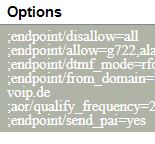
| **Options** | Options provide you with the ability to add further SIP options (one per line). These options must be compatible with Asterisk phone systems. |
{% hint style="success" %}
An overview of SIP options can be found here: [SIP Configuration - peers and clients](http://www.voip-info.org/wiki/view/Asterisk+config+sip.conf#SIPconfigurationspeersandclients)
{% endhint %}
### Registration
| Variables | Description |
| --------------- | ------------------------------------------------------------------------------------------------ |
| **Registation** | Select *Yes* or *No*, depending on whether or not your phone system must register with the host. |
### Port
| Variables | Description |
| --------- | ---------------------------------------------------------------------------------------------- |
| **Port** | Port *5060* is used per defualt. Should a different port be used, you can enter the port here. |
### Number Determination
| Variables | Description |
| ------------------------ | -------------------------------------------------------------------------------------------------------------------------------------------------------------------------------------------------------------------------------- |
| **Number Determination** | The default option to determine the destination number using the SIP-INVITE. Set this option to *yes* and the destination number will be read from the SIP-Header instead. This option is often required by SIP trunk providers. |
### Number Presentation
| Variables | Description |
| ----------------------- | -------------------------------------------------------------------------------------------------------------------------------------------------------------------------------------------------------------------------------------------------------------------------------------------------------------------------------------------- |
| **Number Presentation** |
Calling Line Identification (CLIP) is a feature that enables the transmission of phone numbers for outgoing calls. By default, the automatic Trunk functions take effect, so that the trunk can automatically transmit call numbers. Possible settings: \* AUTO \* FROM \* PPI \* PAI
Calling Line Identification Restriction (CLIR) is a feature that enables call number restriction for outgoing calls. The automatic Trunk function comes into play here as standard, so that the trunk can automatically restrict the number. Possible settings: \* AUTO \* FROM \* Privacy-ID
|
---
# Agent Instructions
This documentation is published with GitBook. GitBook is the documentation platform designed so that both humans and AI agents can read, navigate, and reason over technical content effectively. Learn more at gitbook.com.
## Querying This Documentation
If you need additional information that is not directly available in this page, you can query the documentation dynamically by asking a question.
Perform an HTTP GET request on the following URL with the `ask` and `goal` query parameters:
```
GET https://docs.pascom.net/en/setup/pascom-trunk/accountsettings.md?ask=&goal=
```
`ask` is the immediate question: it should be specific, self-contained, and written in natural language.
`goal` is what the user is ultimately trying to achieve, the reason they need the answer. Sharing it helps GitBook give you a better, more relevant answer. A goal is most helpful when it describes the outcome the user wants rather than restating the question. For example, with `ask=how do I create an API token`, a goal like `build a script that syncs our docs to a CMS` lets GitBook tailor the answer to that use case.
The response will contain a direct answer to the question and relevant excerpts and sources from the documentation.
Use this mechanism when the answer is not explicitly present in the current page, you need clarification or additional context, or you want to retrieve related documentation sections.