> For the complete documentation index, see [llms.txt](https://docs.pascom.net/llms.txt). Markdown versions of documentation pages are available by appending `.md` to page URLs; this page is available as [Markdown](https://docs.pascom.net/en/operations/clients/desktop-update.md).
# Desktop App Update
The PASCOM Desktop App automatically updates itself. Through using our Update Channels, it is very simple to use for example our BETA and feature versions.
## Automatic Updates
The PASCOM App retrieves all updates via HTTPS via [my.pascom.net](https://my.pascom.net/). This enables the backwards compatibility of the desktop App with the PASCOM server. If one or more PASCOM App processes are running and an update is started, all processes are closed.
## Manual Updates
You can disable the automatic updates by using the command line option `--noUpdate` and then self distribute updates or manually install them. The newest desktop App can be downloaded from our [Homepage](https://www.pascom.net/en/downloads/).
For [Terminal Server Installations](/en/operations/clients/windows-installation.md#terminalserver-installation), automatic updates are deactivated even without using the `--noUpdate` option.
If the update is carried out with administrator rights (as with the terminal server installation/update), all apps are stopped for all users so that the administrator can update the applications more easily.
## Update Channels
A number of update channels are available to choose from. These can be found in the desktop App under `Settings` > `About PASCOM App` > `Channel`.
Per default, the `Stable` channel is selected - this contains the same version, which is available to download from our [Homepage](https://www.pascom.net/en/downloads/).
### BETA Programme
You can switch your Update Channel the `BETA` channel at anytime and participate in our BETA programme.
Your input is important to us and we look forward to your feedback in our [Forum](https://www.pascom.net/forum/)
{% hint style="warning" %}
If you wish to switch from a bespoke / custom Update Channel or the `BETA` Channel, all your user profiles will be deleted, as this action normally relates to a downgrade. Saved within your user profile there are settings such as the desktop theme being used or the contact list sorting option. These settings must be then be newly configured.
{% endhint %}
### Feature Channels
Alternatively, you can manually set a feature channel. These are occasionally added to test individual functions and are announced via our [Forum](https://www.pascom.net/forum/) or by our support team.
## Enabling / Disabling Automatic Updates
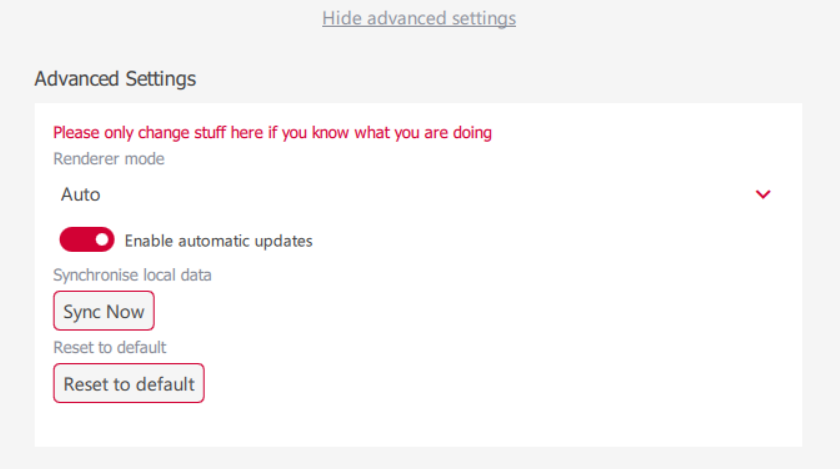
In the app’s **Advanced Settings**, automatic updates can be enabled or disabled.
Alternatively, automatic updates of the PASCOM App can be disabled using environment variables and command line options.
| **Command / Option** | **Type** | **Function** | **Usage** |
| -------------------- | -------------------- | -------------------------------------------------------------- | ------------------------------------------------------------------------------- |
| `PC_NO_UPDATE=1` | Environment variable | Disables automatic updates by setting an environment variable. | Used in a startup script or system environment before launching the PASCOM App. |
| `--noUpdate` | Command line option | Disables automatic updates when launching the app. | Appended directly to the launch command, e.g. `pascom.exe --noUpdate`. |
### Example
**Using an environment variable (e.g. in Linux/macOS Bash or Windows batch):**
```
PC_NO_UPDATE=1 ./pascom.exe
```
For an overview of additional [command line parameters](/en/operations/clients/environment-variables.md)
---
# Agent Instructions
This documentation is published with GitBook. GitBook is the documentation platform designed so that both humans and AI agents can read, navigate, and reason over technical content effectively. Learn more at gitbook.com.
## Querying This Documentation
If you need additional information that is not directly available in this page, you can query the documentation dynamically by asking a question.
Perform an HTTP GET request on the following URL with the `ask` and `goal` query parameters:
```
GET https://docs.pascom.net/en/operations/clients/desktop-update.md?ask=&goal=
```
`ask` is the immediate question: it should be specific, self-contained, and written in natural language.
`goal` is what the user is ultimately trying to achieve, the reason they need the answer. Sharing it helps GitBook give you a better, more relevant answer. A goal is most helpful when it describes the outcome the user wants rather than restating the question. For example, with `ask=how do I create an API token`, a goal like `build a script that syncs our docs to a CMS` lets GitBook tailor the answer to that use case.
The response will contain a direct answer to the question and relevant excerpts and sources from the documentation.
Use this mechanism when the answer is not explicitly present in the current page, you need clarification or additional context, or you want to retrieve related documentation sections.