> For the complete documentation index, see [llms.txt](https://docs.pascom.net/llms.txt). Markdown versions of documentation pages are available by appending `.md` to page URLs; this page is available as [Markdown](https://docs.pascom.net/account/mypascom-userguide/subscriptions.md).
# Meine Abonnements
Hier finden Sie nützliche Informationen zu Ihren eigenen Abonnements
Im myPASCOM Kundenportal finden Sie unter dem Menüpunkt **Abonnements** - **Meine Abonnements** eine Übersicht über alle Ihre Abonnements. Ein **Abonnement** ist auch gleichzeitig gekoppelt mit Ihrer **Telefonanlage**. Es fühlt sich daher so an, als würden Sie auch Ihre Telefonanlagen verwalten. Das Abonnement übernimmt den kaufmännischen Part in der PASCOM Welt. Das Abonnement wird auch oft als (engl. **Subscription**) bezeichnet.

## Ein Abonnement ist gleichzeitig die Telefonanlage
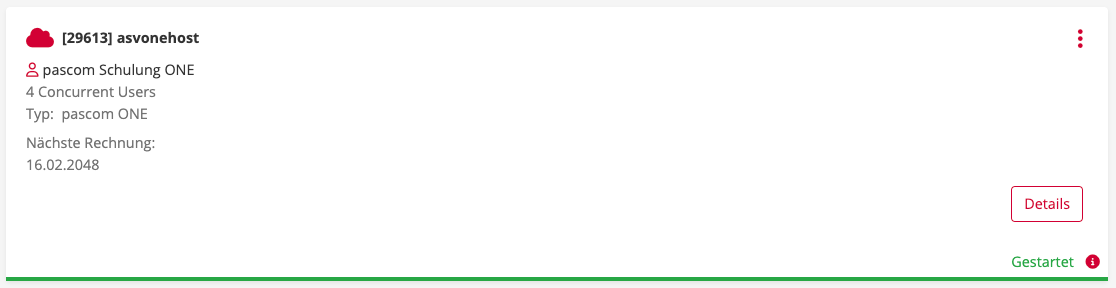
Wir haben nun erfahren, dass ein Abonnement gleichzeitig auch die Telefonanlage wiederspiegelt. Schauen wir uns einmal an, welche Daten man aus einem einzelnen Abonnement entnehmen kann und wie diese interpretiert werden.
**Erklärung der Abonnementübersicht:**
| Daten | Beschreibung |
| ------------------- | -------------------------------------------------------------------------------------------------------------------------------------------- |
| Appliance-ID | Die ID des Abonnement bzw. der Telefonanlage in der PASCOM Cloud |
| asvonehost | Name der Telefonanlage in der PASCOM Cloud |
| PASCOM Schulung ONE | Der Besitzer des Abonnement bzw. der Telefonanlage |
| 4 Concurrent User | Anzahl der gebuchten Lizenzen in diesem Abonnement. Diese Anzahl kann von Benutzern und Geräten auf der PASCOM Telefonanlage genutzt werden. |
| Type: PASCOM ONE | Der gebuchte Produkttyp in diesem Abonnement. Spiegelt auch die Art der Telefonanlage wieder |
| Nächste Rechnung | Hier sehen Sie, wann die nächste Rechnung für Ihr Abonnement erstellt wird |
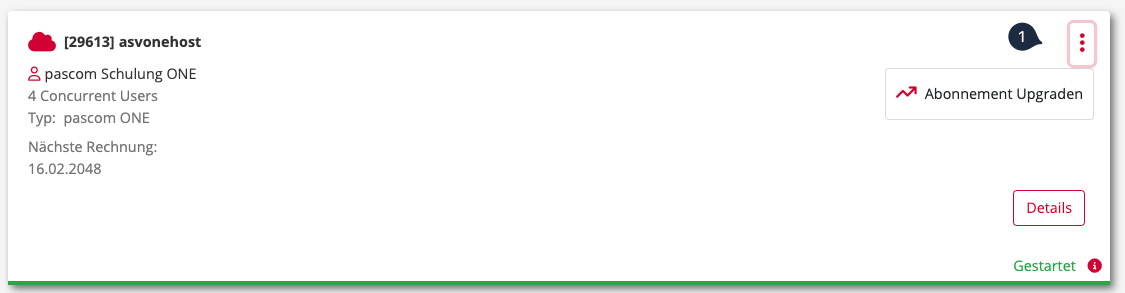
Sie können direkt in der Abonnementenübersicht mit einem Klick auf die **3 Punkte** das Abonnement weiter upgraden und somit die Lizenzanzahl erweitern.
## Die Abonnementdetails im Überblick
Wenn Sie in der Abonnementübersicht auf den Button **Details** klicken, gelangen Sie in die Abonnementdetails, welche spezifisch für das gewählte Abonnement sind. Von hier aus verwalten Sie das Abonnement, können **Upgrades vornehmen**, den **Technischen Support** in Anspruch nehmen, den **Telefontarif ändern**, oder auch das Abonnement kündigen.

---
# Agent Instructions
This documentation is published with GitBook. GitBook is the documentation platform designed so that both humans and AI agents can read, navigate, and reason over technical content effectively. Learn more at gitbook.com.
## Querying This Documentation
If you need additional information that is not directly available in this page, you can query the documentation dynamically by asking a question.
Perform an HTTP GET request on the following URL with the `ask` and `goal` query parameters:
```
GET https://docs.pascom.net/account/mypascom-userguide/subscriptions.md?ask=&goal=
```
`ask` is the immediate question: it should be specific, self-contained, and written in natural language.
`goal` is what the user is ultimately trying to achieve, the reason they need the answer. Sharing it helps GitBook give you a better, more relevant answer. A goal is most helpful when it describes the outcome the user wants rather than restating the question. For example, with `ask=how do I create an API token`, a goal like `build a script that syncs our docs to a CMS` lets GitBook tailor the answer to that use case.
The response will contain a direct answer to the question and relevant excerpts and sources from the documentation.
Use this mechanism when the answer is not explicitly present in the current page, you need clarification or additional context, or you want to retrieve related documentation sections.