> For the complete documentation index, see [llms.txt](https://docs.pascom.net/llms.txt). Markdown versions of documentation pages are available by appending `.md` to page URLs; this page is available as [Markdown](https://docs.pascom.net/account/mypascom-userguide/pascom-credits.md).
# PASCOM Credits
PASCOM Credits sind das Guthaben in der PASCOM Welt. Erfahren Sie mehr darüber.
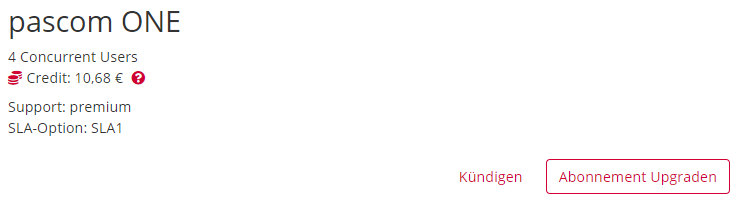
Guthaben in der PASCOM Welt wird als **PASCOM Credits** bezeichnet. Dieses Guthaben können Sie auf unterschiedliche Art und Weise erhalten. Eine Übersicht über Ihre aktuellen PASCOM Credits bekommen Sie in den [Accountdetails](/account/mypascom-userguide/subscriptions.md), oder auch in Ihrer monatlichen Rechnung.
### Woher kommen PASCOM Credits?
PASCOM Credits entstehen oftmals durch den monatlichen Abrechnungszeitraum. Bedeutet, dass Sie sehr flexibel Produktupgrades durchführen können.
**Beispiel:**
Sie entschließen sich zu einem Upgrade Ihres Abonnements und befinden sich gerade mitten im Monat. Beim Kauf eines Upgrades werden Sie mit dem ausgewiesenen Rechnungsbetrag belastet, bekommen jedoch für den Zeitraum rückwirkend bis zum Anfang des Monats, eine Gutschrift in Form von PASCOM Credits.
### Wofür benutzt man PASCOM Credits?
Die PASCOM Credits werden ausschließlich für den **nächsten Rechnungslauf verwendet und verrechnet**. Das Guthaben kann daher nicht in Form eines Gutschein oder einer Überweisung ausbezahlt werden. Auch eine Übertragung an Dritte ist nicht möglich.
{% hint style="info" %}
Gutgeschriebene Credits können nicht ausbezahlt werden!
{% endhint %}
---
# Agent Instructions
This documentation is published with GitBook. GitBook is the documentation platform designed so that both humans and AI agents can read, navigate, and reason over technical content effectively. Learn more at gitbook.com.
## Querying This Documentation
If you need additional information that is not directly available in this page, you can query the documentation dynamically by asking a question.
Perform an HTTP GET request on the following URL with the `ask` and `goal` query parameters:
```
GET https://docs.pascom.net/account/mypascom-userguide/pascom-credits.md?ask=&goal=
```
`ask` is the immediate question: it should be specific, self-contained, and written in natural language.
`goal` is what the user is ultimately trying to achieve, the reason they need the answer. Sharing it helps GitBook give you a better, more relevant answer. A goal is most helpful when it describes the outcome the user wants rather than restating the question. For example, with `ask=how do I create an API token`, a goal like `build a script that syncs our docs to a CMS` lets GitBook tailor the answer to that use case.
The response will contain a direct answer to the question and relevant excerpts and sources from the documentation.
Use this mechanism when the answer is not explicitly present in the current page, you need clarification or additional context, or you want to retrieve related documentation sections.